Picture this. You hire an intern and hand them a pile of work: book a flight, fill a form, sort a folder of files. Then you set one rule: you may only look at the screen and only use the mouse and keyboard. No peeking at the application’s backend. No DOM tree, no accessibility metadata, no task-specific API.
Sounds brutal. That is exactly what the paper arXiv 2608.02352, Qwen-CUA: Native Computer Use for (almost) Everything, does. Qwen Team partnered with the Xlang Lab at the University of Hong Kong, more than thirty authors listed, the GitHub repo already live at xlang-ai/Qwen-CUA, and the submission dated 2026-08-04.
This whole article is one question:can an intern with rules this strict actually be trained to be useful?
Why the rule has to be this strict
An AI that wants to do real work in the digital world has three doors: write code, call an API, or operate a graphical interface. Foundation models have become very good at the first two, since they read text well and orchestrate tools well.
Most of the actual work does not live behind those two doors. Desktop applications, legacy systems, professional tools, dynamic websites: their functionality exists only as pixels on a screen, unreadable to a machine. “Eyes on the screen, hands on the mouse and keyboard” is not self-punishment. It is the only door that opens onto every piece of software a person can touch.
But the door has three hard problems baked in, and the paper’s Section 1 lays them out plainly:GUI state is only partially observable, errors compound across long workflows, and the evidence is scattered across dozens of screenshots.Let us walk through how Qwen-CUA tackles each one, starting with the most basic setup: eyes and hands.
Pass 1: Equip the eyes and the hands
Section 2.1 hands the intern a minimal toolkit, drawn in Figure 2.
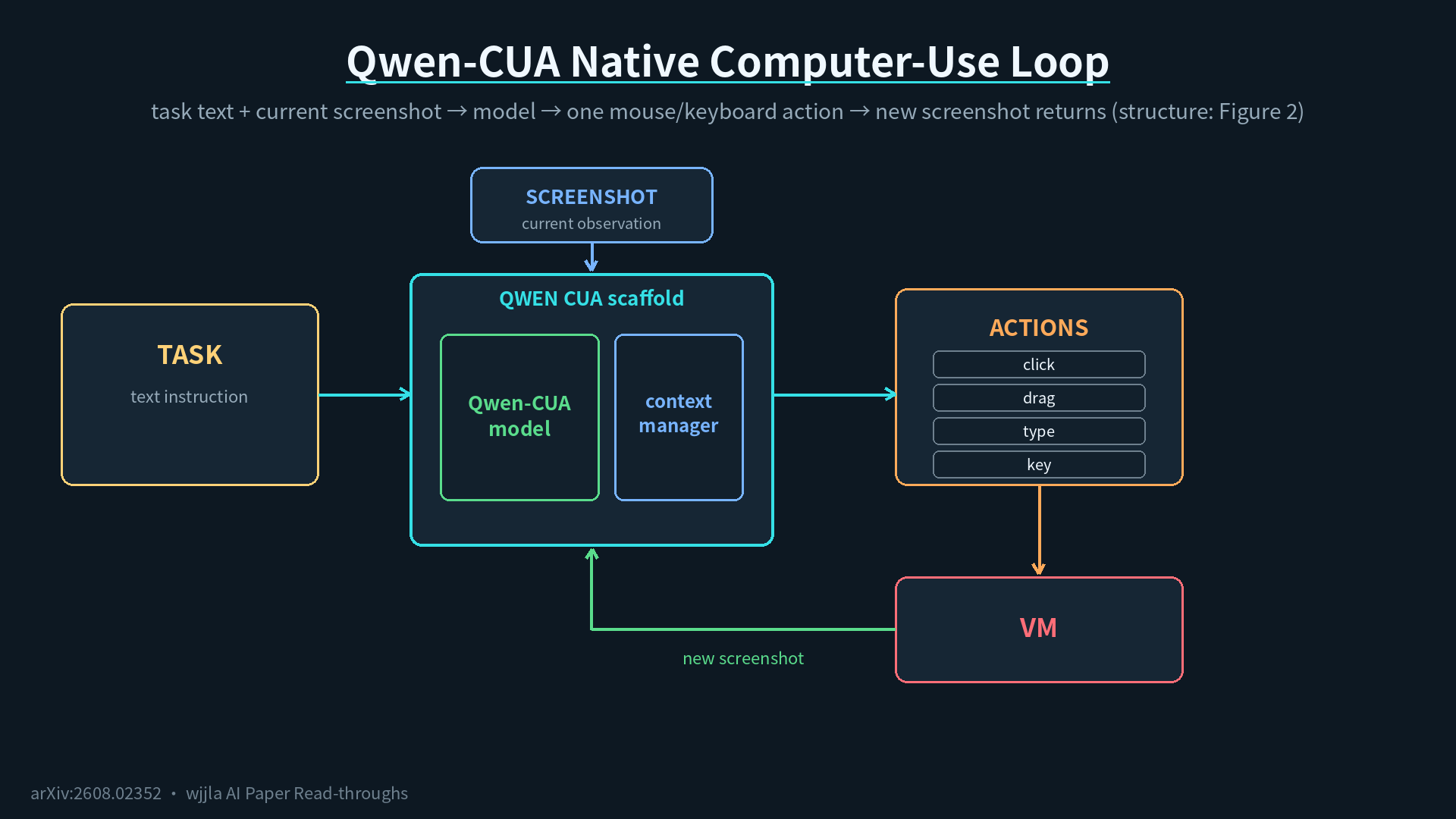
The whole loop fits in one sentence:take a task description in text, observe one current screenshot, emit one keyboard-and-mouse action.That action is one of three families: mouse (move, left/right/middle clicks, double and triple clicks, drag, scroll), keyboard (key combos, hold and release, text typing), or control (request a screenshot, wait, terminate, call the user). Appendix A lists the full action schema.
In the middle sits something the paper calls a scaffold, and you can think of it as the desk coordinator: it hands the task to the model, feeds in the screenshot, delivers the action to the virtual machine, captures the next screenshot, and loops. You do not need to know its internals. Every round, the agent does exactly one thing.
There is a sentence in the paper I have to translate out of jargon:this toolkit works unchanged across browsers and desktop applications. Zero configuration per app.No DOM tree, no accessibility metadata, no specialized API. It is just one standard pair of human eyes and human hands.
Equipping eyes and hands is the easy part. The hard part shows up the moment a task gets long and the intern starts forgetting.
Pass 2: Out of memory, sticky notes to the rescue
Section 2.2 is the fix for that forgetting.
A long task piles up dozens or hundreds of screenshots, and nobody can hold all of those in short-term memory. Qwen-CUA uses what amounts to a desk-side notebook:
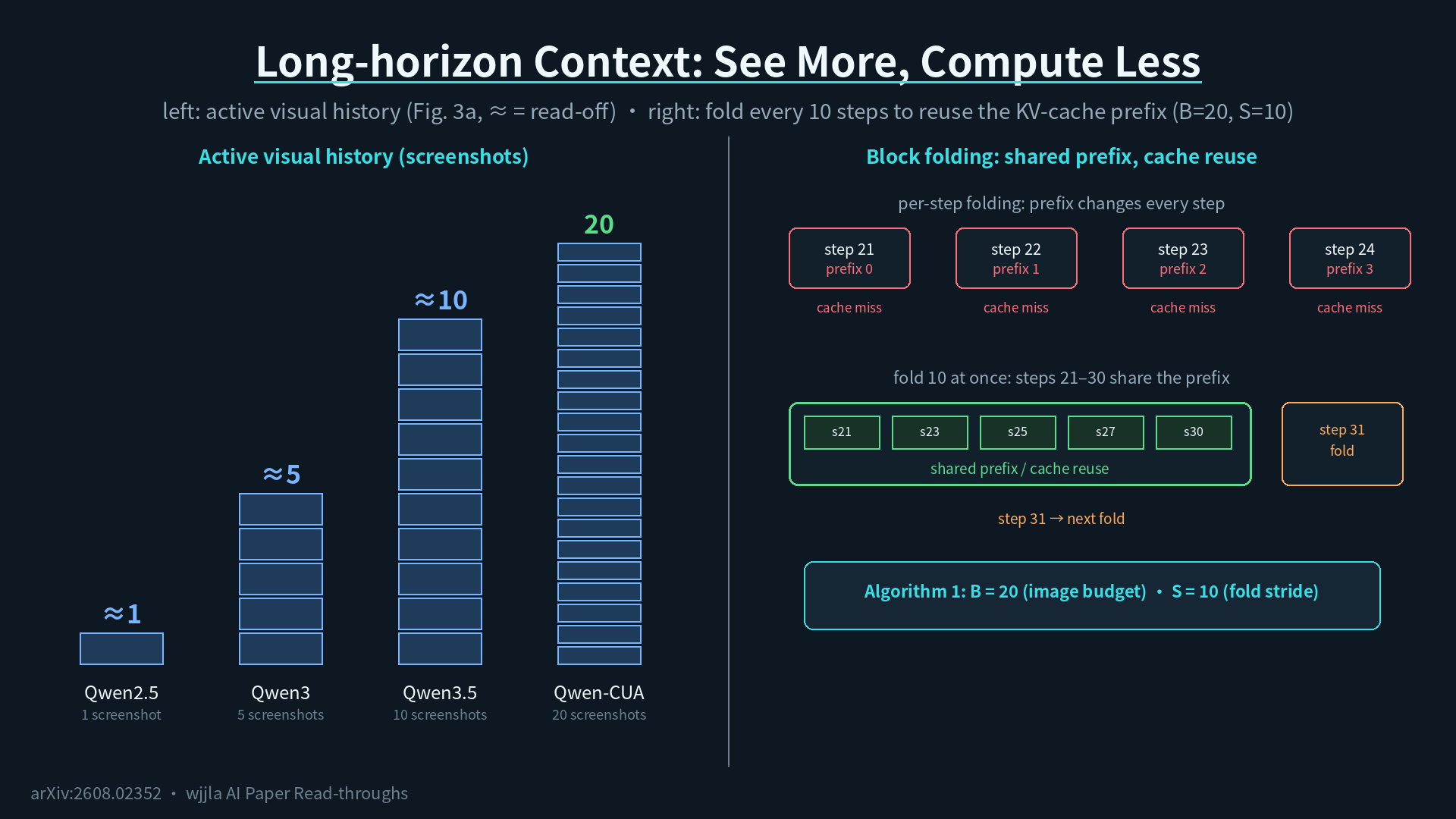
- Active visual history is capped at 20 screenshots.The most recent 20 stay flat on the desk, fully visible.
- Every time the pile grows by 10, the older screenshots get folded.Folding is not deletion. Each older screenshot turns into a short text placeholder of the form “there used to be a screenshot here, and at that point the agent did X.” The actions taken and the reasoning behind them all stay in the conversation. Only the pixel vanishes.
Figure 3(a) in the paper visualizes how each successive Qwen model has spread its desk wider: Qwen2.5 sees 1 screenshot, Qwen3 sees 5, Qwen3.5 sees 10, and Qwen-CUA pushes that to 20. Figure 3(b) compares two folding strategies: per-step refold (the prefix changes every step) versus blockwise fold every 10 steps. The blockwise version shares the prefix across an entire stretch, so the KV-cache gets reused instead of recomputed.
One detail from training deserves to be flagged: reinforcement learning reuses the same folding operator. A single long trajectory gets sliced into multiple context-bounded pieces, and every slice inherits the same terminal reward. No hand-designed step-level rewards required. The supervision signal that lives in the final state flows all the way back into the middle of the trajectory.
Eyes, hands, sticky notes. All in place. Now the real question:how does this intern actually get trained?
Pass 3: How to train it — first, build a 100,000-core driving school
The hardest part of training a computer-use agent is not the model. It is finding a place where the agent can fail and try again, millions of times.
The authors built one. It runs on Alibaba Cloud ECS, with access tonearly 100,000 virtual CPUsandthe capacity to spin up tens of thousands of concurrent environments. Each virtual machine is its own isolated desk, free for the agent to mess up.
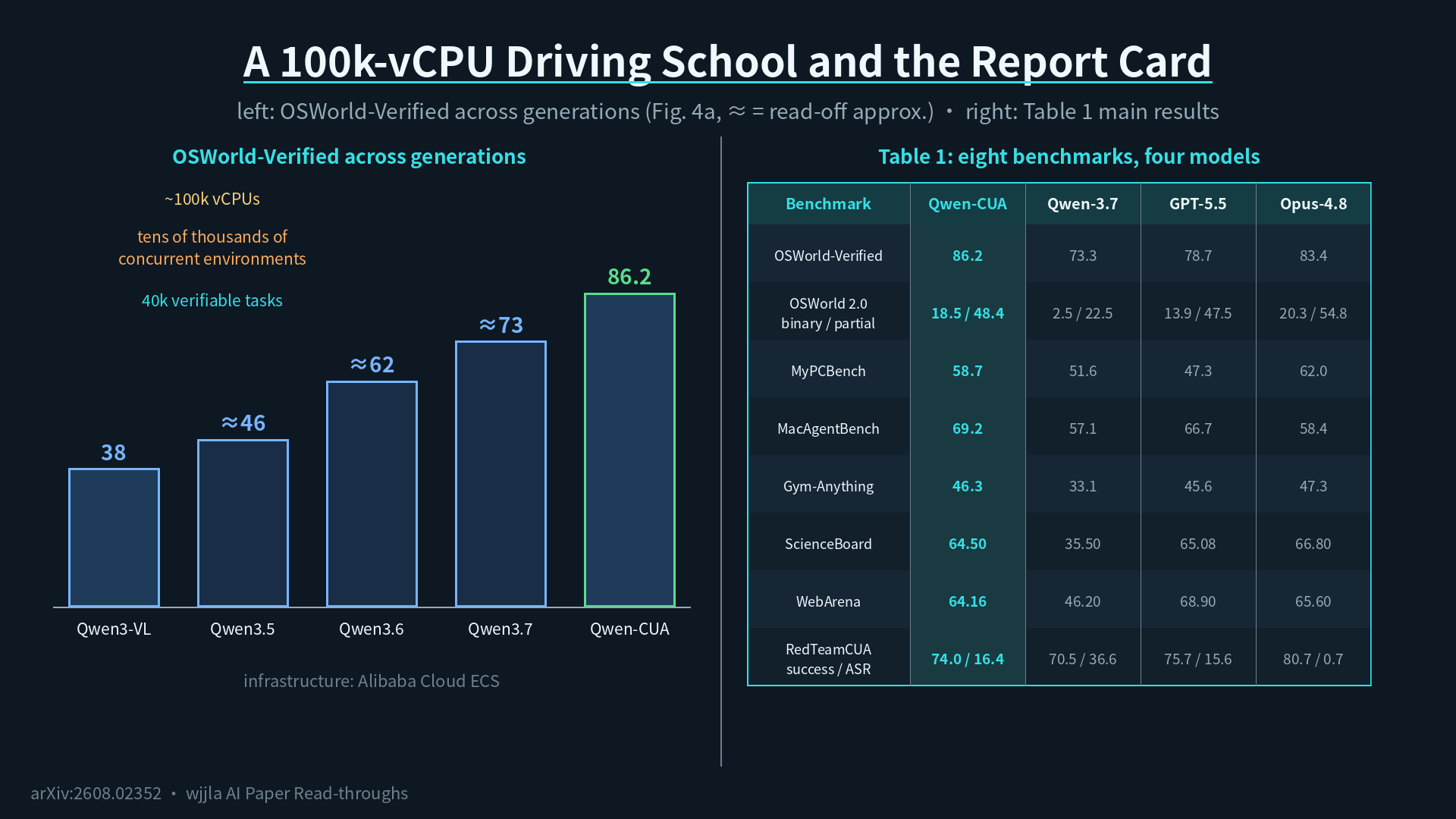
Figure 4(a) is the visual that ties this together: OSWorld-Verified scores across successive Qwen generations climb from Qwen3-VL at 38, to Qwen3.5 at 46, to Qwen3.6 at 62, to Qwen3.7 at 73, and finally to Qwen-CUA at 86.2. The figure also marks three milestones:approximately 40,000 verifiable tasks, around 100,000 vCPUs, and tens of thousands of concurrent environments.
The driving school and the exam room are both built. Where do the textbooks come from? That is the next pass.
Pass 4: The textbooks — three exercise types plus one human tutor
The training corpus splits into three exercise categories and one human-tutor category. Here is the compressed syllabus:
- Environment-operation exercises (type one)teach the agent to read buttons, menus, and state transitions inside a specific application.
- User-interactive exercises (type two)deliberately give the agent under-specified tasks and watch whether it knows to ask. These exercises borrow the simulated-user idea from OSWorld 2.0: the simulated user only speaks up if asked.
- Long-horizon exercises (type three)break a big workflow into a chain of auto-gradable phases. Each phase has a verifiable terminal state, and once that state is confirmed it gets serialized and used to seed the next phase. The paper calls this phase-state chaining, and Section 3.2.2 goes deep on the design.
- Human-tutor demonstrations (type four)let real annotators do real work on their own desktops: booking flights, filling forms, modeling parts in CAD, sculpting in Blender. The model then writes a chain-of-thought “inner monologue” for each step, filtered through two consistency checks against the screenshot at that moment and the action that was taken.
Four buckets combined equal the entire curriculum.But the rarest ingredient in agent training is not data. It is an algorithm that lets the agent get better by failing.
Pass 5: The coaching method — getting better by trying and failing
Section 3.3 covers the reinforcement-learning side. The algorithm is called SAPO, short for Soft Adaptive Policy Optimization. The name does not matter; the recipe is “do something right, gain credit; do it wrong, lose credit,” and SAPO is one of the latest takes on that recipe.
Figure 5 visualizes the training dynamics. Two trends to track:
- The training-task rewardrises from an early dip near 0.49 to approximately 0.64, with noticeable jitter because each batch mixes heterogeneous tasks and stochastic trajectories.
- The cross-domain validation scoreclimbs from 0.734 before RL toa peak of 0.770 at checkpoint 40 (that is update 800), and that checkpoint is the one the authors pick as the final model. The full run continues to the planned 1,000-update budget, where checkpoint 50 lands at 0.762.
Section 3.4 adds an iteration loop on top:each round, run the latest model to surface its remaining weaknesses, regenerate fresh demonstrations for those weak spots, then train the next round from there.Concretely, the loop does two things. First, it has the newest model try all existing SFT queries and collects the ones it still fails; those queries get regenerated by a stronger teacher policy. Second, it calibrates the RL task pool with a difficulty filter: run eight trial rollouts per candidate task, drop the tasks that the current policy never solves (too hard) and the ones it always solves (too easy), keep the rest. That “self-pick-the-questions” logic keeps training on the productive edge.
Trainee is graduated. Time for the exams.
Pass 6: Eight-exam report card
The exam suite has eight benchmarks, and Table 1 in the paper is the headlining scoreboard.
The marquee exam isOSWorld-Verified: Qwen-CUA scores 86.2, its predecessor Qwen3.7 scores 73.3, the closed-source competitors GPT-5.5 and Claude Opus 4.8 score 78.7 and 83.4 respectively. Across the eight benchmarks, Qwen-CUA takes the top spot on two (OSWorld-Verified, and MacAgentBench at 69.2), and stays competitive elsewhere — Opus 4.8 still edges it out on OSWorld 2.0 and RedTeamCUA.
The harderOSWorld 2.0 long-horizon examis where the lead gets dramatic: Qwen-CUA posts18.5 binary completion plus 48.4 partial completion, against Qwen3.7’s 2.5 and 22.5. Binary completion roughly seven times the predecessor.
Figure 1 plots all eight benchmarks as bar charts. In each cluster, the darkest bar is Qwen-CUA-Max, which gets its own section below.
One fact to lock in: across all eight benchmarks, the model beats its own predecessor on every single one.
But hold the applause for a moment. Could the gain just be “thinking longer, talking more”?
Pass 7: Is the scorecard inflated — an efficiency audit
That is a fair question, and Section 4.1 answers it head-on, in Figure 6.
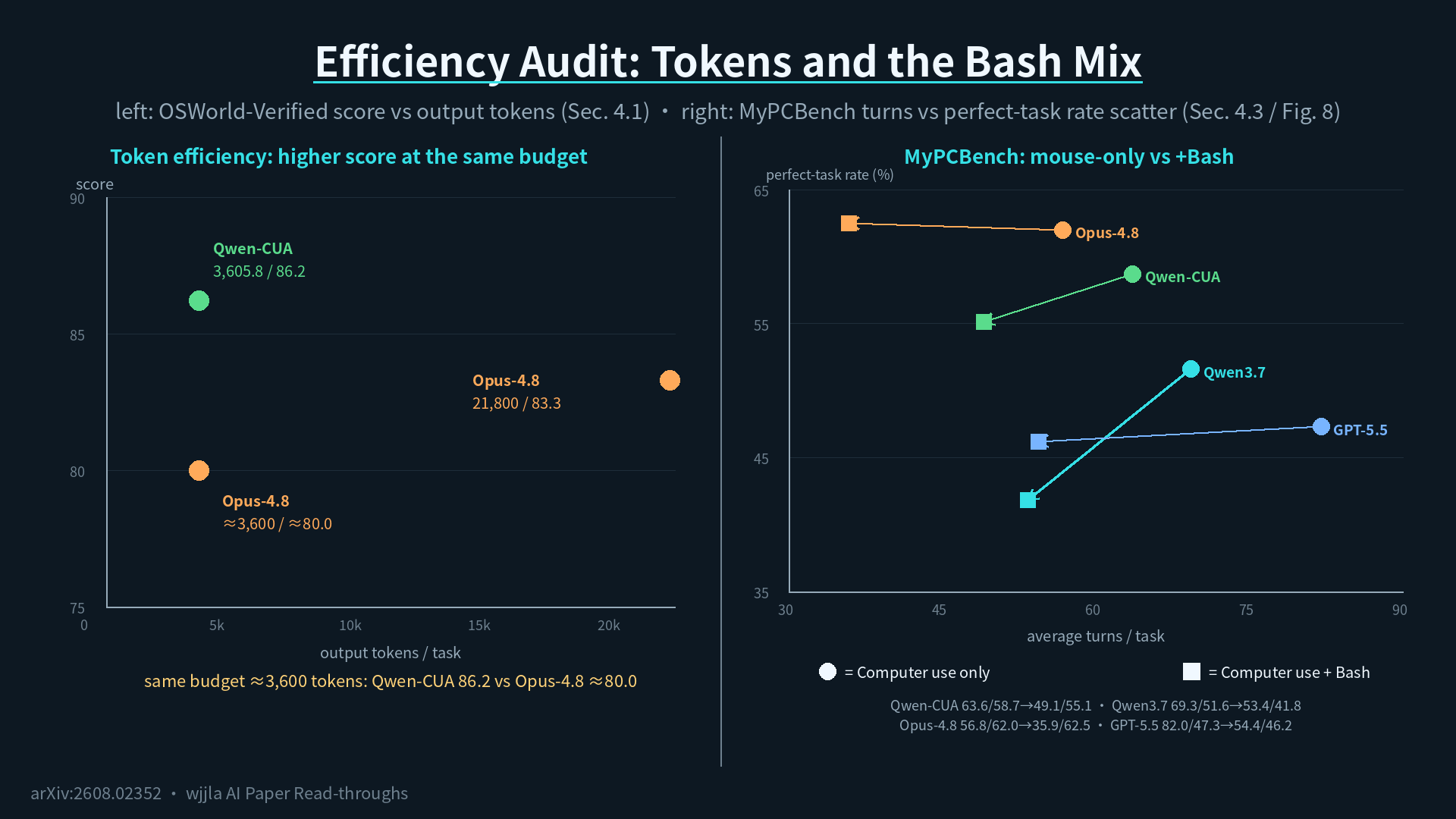
The left panel is token efficiency.The x-axis is output tokens per task, the y-axis is OSWorld-Verified score. Qwen-CUA reaches86.2 with 3,605.8 output tokens. On the same budget, Claude Opus 4.8 only reaches 80.0. To get Opus 4.8 to 83.3, the paper notes, it costs 21.8K tokens. Qwen-CUA’s gain is not coming from verbosity.
The right panel is interaction efficiency.On OSWorld 2.0, Qwen-CUA averages218.9 model turns per task, versus GPT-5.5 at 83.5. The authors flag this carefully: GPT-5.5 and Claude Opus 4.8 can batch multiple actions into one turn, while Qwen-CUA emits exactly one native action per turn. The turn gap is partly an artifact of interface granularity, not a measure of underlying action efficiency.
Efficiency box checked. Being able to do the work is one thing. Being trustworthy while doing it is another.
Pass 8: Can you trust it — phishing-style safety tests
Computer-use agents face one trap that pure language models do not:the screen content itself can be a hostile prompt injection.A webpage pops up a “Claim Your Subsidy” button; clicking it actually wires money to the attacker.
RedTeamCUA is the benchmark built for exactly this, and it reports two numbers together: did the agent finish the benign task, and did it fall for the bait? Qwen-CUA improves on both metrics versus Qwen3.7:
- Benign task success rises from 70.5 to 74.0;
- Attack success rate (ASR) drops from 36.6 to 16.4, a 20.2-point reduction.
A rare double win: better at the task, harder to trick. Table 2 shows the improvement holds across all three platform slices (ownCloud, Rocket.Chat, Reddit).
The authors stay honest here:16.4 percent ASR is residual risk, not a deployment-grade safety guarantee.On Rocket.Chat in particular, ASR has to be read alongside task success, because some failures look like “rejected the bait” but are actually “got stuck.”
Exams are done. But the real world is messier than the test room.
The real world: Qwen for Chrome, the live deployment
Section 4.2 leaves the exam room for live internet traffic. Figure 7 is a Chrome screenshot with a Qwen sidebar pinned to the right edge. That sidebar isQwen for Chrome, an internal Chrome extension.
It runs against live websites. Every step is shown to the user, no black box. When a consequential action is about to fire, like a payment or a file deletion, a confirmation dialog pops up first.
Appendix E walks through an end-to-end case: the agent buys and configures a cloud virtual machine through the browser, clicking every step of the way. The point of the showcase is not the score. It is that the same policy can operate outside benchmark sandboxes on naturally occurring websites.
But in real workflows, clicking alone is not enough. Every old-school engineer knows there is also a command line.
Pass 9: Should we hand it a shell — the surprise in Bash augmentation
Section 4.3 asks a very practical question: alongside mouse and keyboard, do we give the agent access to a Bash tool?
The answer:with Bash, the path gets shorter, but success rate dips slightly.
Figure 8 plots this as a scatter (note: scatter, not bars):
- Adding Bash dropsQwen-CUA’s average turns on MyPCBench from 63.6 down to 49.1;
- Butperfect-task rate slips from 58.7 to 55.1.
Qwen3.7 follows the same pattern: 69.3 → 53.4 turns, 51.6 → 41.8 success.
The authors’ read:this is not an indictment of the hybrid interface, it is an optimization gap.The model has not yet learned when to switch. Bash provides a shorter route when the task fits, but poorly-timed switches can hurt completion. The paper explicitly calls out future work in joint training and explicit tool-routing supervision as the path to recover the success rate while keeping the efficiency gain.
Worth pausing on.More tools available does not automatically mean a better agent.
Pass 10: A bigger brain — Qwen-CUA-Max
Section 4.4 takes a different route. Take the 397B-A17B base and scale it up toover one trillion total parameters. Same training recipe. New name:Qwen-CUA-Max.
Results:
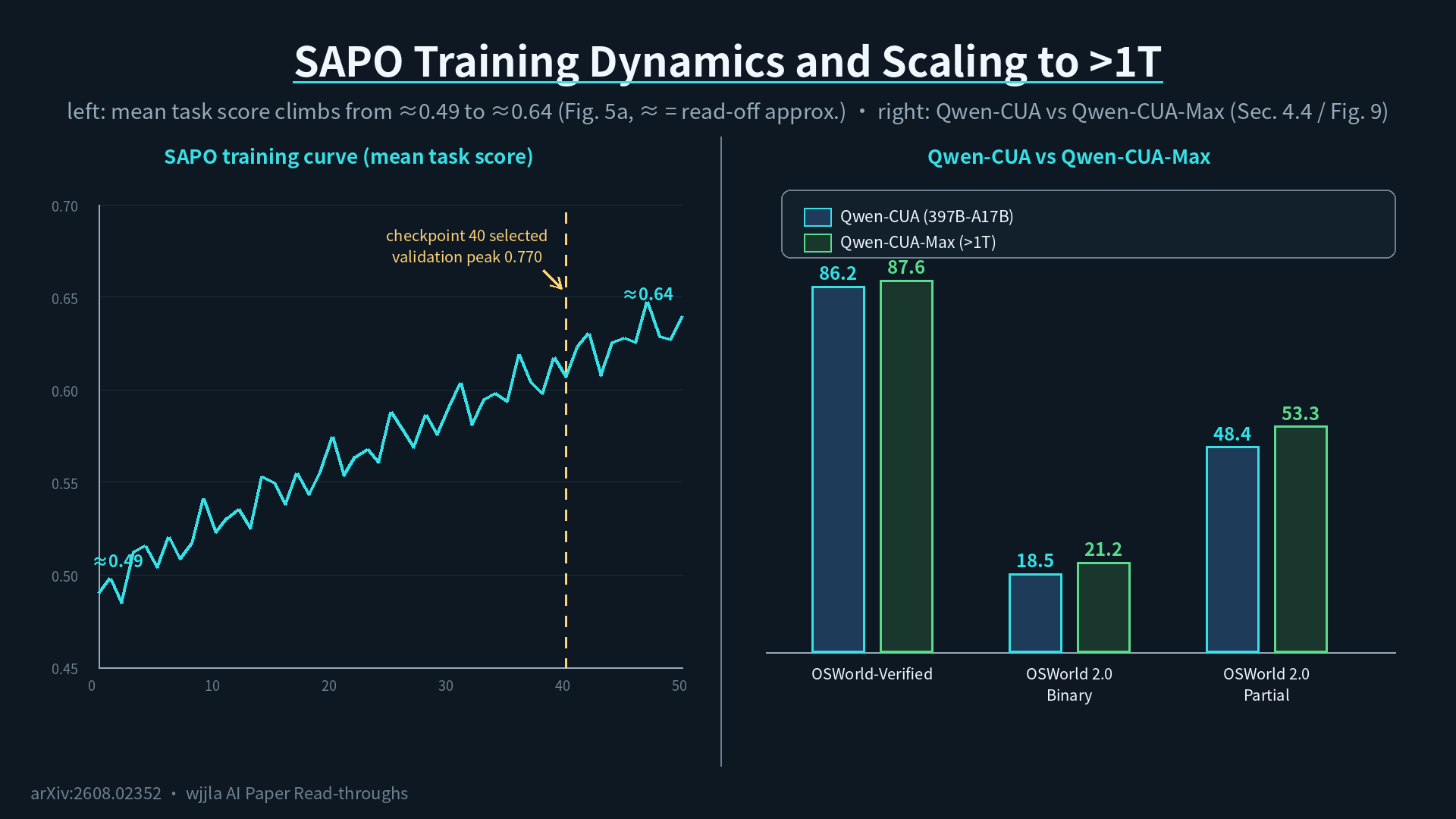
- OSWorld-Verified: 86.2 → 87.6;
- OSWorld 2.0 binary completion: 18.5 → 21.2;
- OSWorld 2.0 partial completion: 48.4 → 53.3(the largest gain of the three).
In other words, the recipe is not yet saturated. More capacity keeps adding points.
Exams, real deployment, tool augmentation, scaling. All covered. Back to the original question.
A few reminders worth flagging after reading this
First,the pixel-only path works, but it is slow and expensive.A pixel-only agent is inherently slower than a DOM-based one, because every step re-feeds a fresh screenshot through the model, and each forward pass costs tens to hundreds of milliseconds. The paper’s Conclusion says it plainly: “Generality does not imply optimality.” The value of this path iscoverage— desktop software, dynamic websites, professional tools all become reachable. If the job fits inside code or an API, that path is cheaper.
Second,16.4 percent ASR is not zero.Dropping RedTeamCUA attack success from 36.6 to 16.4 is a major improvement, but it still means 16 out of 100 baited screens trick the agent. For enterprise deployment this number demands a human safety net, which is exactly why the Qwen for Chrome design surfaces a confirmation dialog for consequential actions. That is not feature decoration, it is a real requirement.
Third,Bash augmentation hurting the score is a warning shot for the whole agent-tool ecosystem.“More callable tools” does not equal “better outcomes.” Qwen-CUA has not yet learned when to pick which hand. This is the next frontier for RLHF and agentic RL. The authors do not dress this up as a win. They write it as “an optimization gap,” and that kind of honesty is worth emulating across the field.
Fourth,the internal-only Chrome plugin is not public.Qwen for Chrome runs inside the team, and the paper does not promise a public release date. That is an unstated limit: however strong the model is, until there is a real entry point in developers’ hands, the impact stays at the paper-numbers layer. For readers asking “can I use this today,” the paper offers a ceiling, not a product launch timeline.
Fifth,the >1T-parameter Max model gets only a passing mention.The paper does not dedicate a section to training cost, inference latency, or a head-to-head analysis between Max and the base. From an engineering angle, 1T is the era’s “small upgrade,” but RL training cost, KV-cache pressure, and long-trajectory memory footprint are all left undisclosed. To reproduce Max’s numbers, the paper does not yet give enough detail.
One-line summary
An AI limited to pixels and a mouse can actually be trained to be useful — Qwen-CUA beats its predecessor on all eight benchmarks and trades blows with the closed-source heavyweights. But “trained” is not “ready to deploy”: 16.4 percent attack success rate remains, the pixel path is slow and expensive, and the agent has not yet learned when to pick which tool. Qwen-CUA is best read as engineering proof that a “universal visual layer” can serve as the foundation of a hybrid agent, not as the final word on that agent.
Paper: Qwen-CUA: Native Computer Use for (almost) Everything arXiv: https://arxiv.org/abs/2608.02352 Project: https://github.com/xlang-ai/Qwen-CUA